Core Features
From inventory entry to low-stock alerts to automatic reordering — full workflow coverage
Real-Time Inventory Monitoring
View material, tool, and equipment stock levels across all warehouses in one place. Every receipt, dispatch, and transfer updates instantly for always-accurate data.
- Centralized multi-warehouse view
- Real-time stock level updates
- Filter by category and location
Automatic Low-Stock Alerts
Set minimum stock thresholds for each item. When inventory drops below the threshold, the system automatically alerts you and suggests reorder quantities.
- Custom minimum stock thresholds
- Automatic alert notifications
- One-click reorder PO generation
Complete Transaction History
Track every inventory movement: restocking, project withdrawals, surplus returns, inter-warehouse transfers, and manual adjustments — full audit trail.
- All movements auto-recorded
- Filter by type and date
- Export transaction reports

Warehouse Management
Full visibility from central warehouse to project site
Track every step of material flow from warehouse to job site. Surplus materials from completed projects are automatically returned to inventory, reducing waste and duplicate purchases.
How It Works
The system automatically records four types of inventory movements, ensuring every transaction is fully traceable
Restock Order
+InboundWhen stock falls below threshold, the system suggests reorder quantities. Generate a PO to the supplier with one click — inventory updates automatically upon receipt.
Project Withdrawal
-OutboundWhen the job site needs materials, submit a withdrawal request through the system. After approval, stock is auto-deducted and the record links to project costs.
Surplus Return
+ReturnAfter project completion, unused materials are returned to the warehouse. The system auto-updates inventory quantities, reducing waste and duplicate purchases.
Inter-Warehouse Transfer
↔ TransferFlexibly allocate inventory between warehouses. The source warehouse deducts and the destination adds — transfer records are fully preserved.
Product Preview
One dashboard for all your inventory
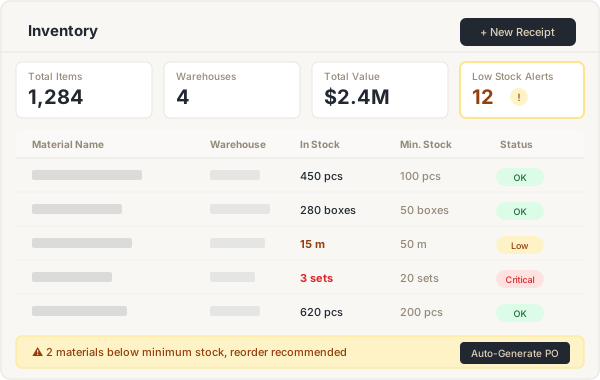
A clear table view shows each item's name, warehouse location, current stock, and minimum stock. Low-stock and insufficient items are auto-highlighted, with a one-click reorder PO shortcut at the bottom.
- Flexible filtering by warehouse, category, and status
- Auto-highlight low-stock items
- One-click reorder PO generation
- CSV bulk import and export support